The last post was about a picture. This one is about the same numbers moving, because a still figure asks you to read it and a moving one asks you to watch, and I would rather somebody watched.
There are three animations here and two controls you can actually drag. Everything in all five comes out of the same arithmetic. Nothing is a recording of a thing I made once.
The ship, turning
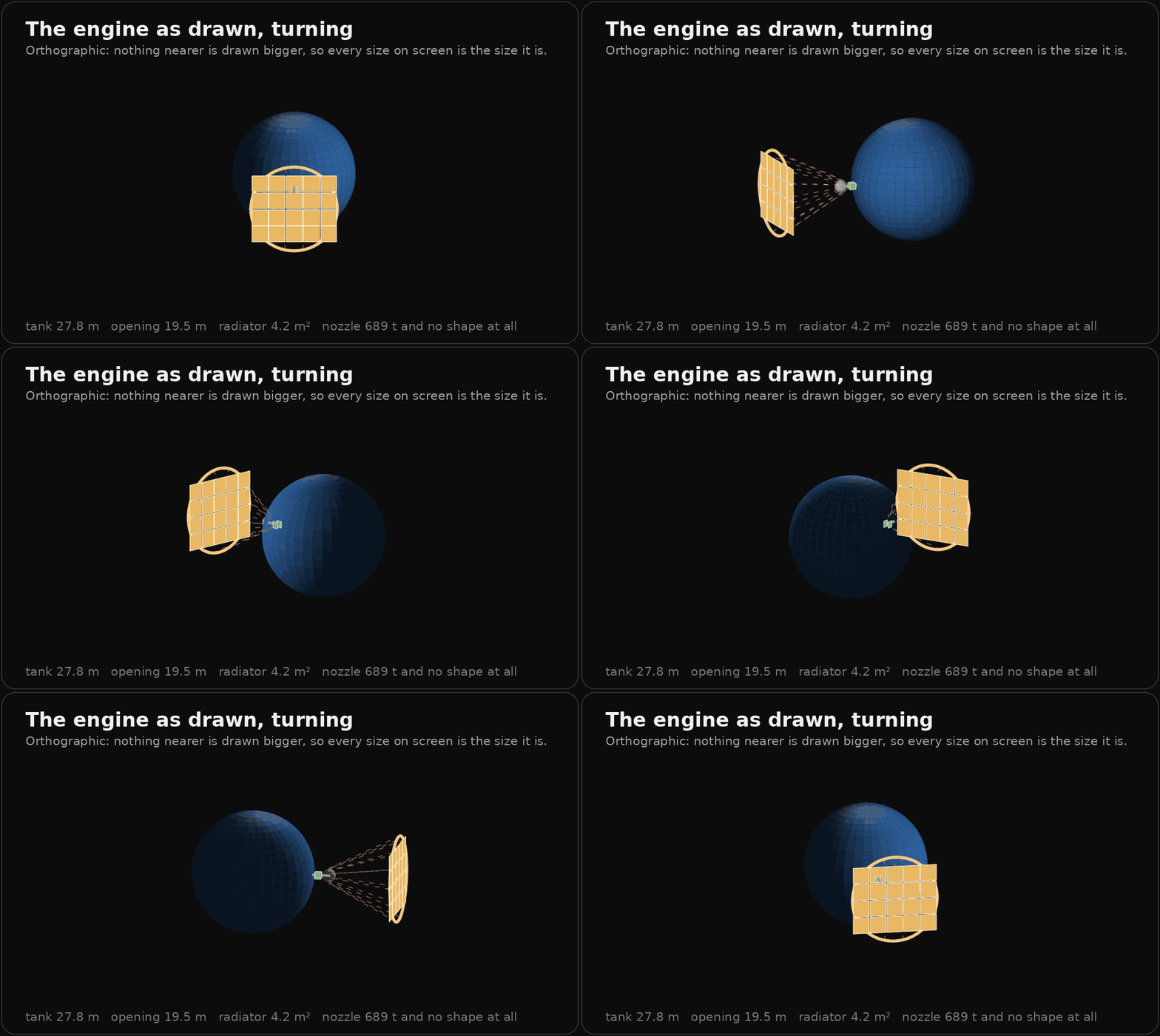
This is the engine as the modules size it, turned all the way round. The tank is 27.8 metres across because 800 tonnes of liquid hydrogen takes up 11,291 cubic metres. The opening is 19.5 metres across because the spec asks for 300 square metres. The radiator is the two small green squares, four and a quarter square metres in total, which is the thing every other fusion ship drawing gets wrong by about three orders of magnitude.
It is orthographic, which is the one decision inside it. Under an ordinary perspective camera the opening sits nearer than the tank and draws larger, and it is not larger: 19.5 against 27.8. A camera that reverses two of the figure's own dimensions to look more dramatic is not a camera, it is an edit. So nothing nearer is drawn bigger, and the price is that the turn looks a little flat. Worth it.
The dashed cone is still not a shape. It is where the nozzle would be if the nozzle had a where.
The nozzle eating the ship
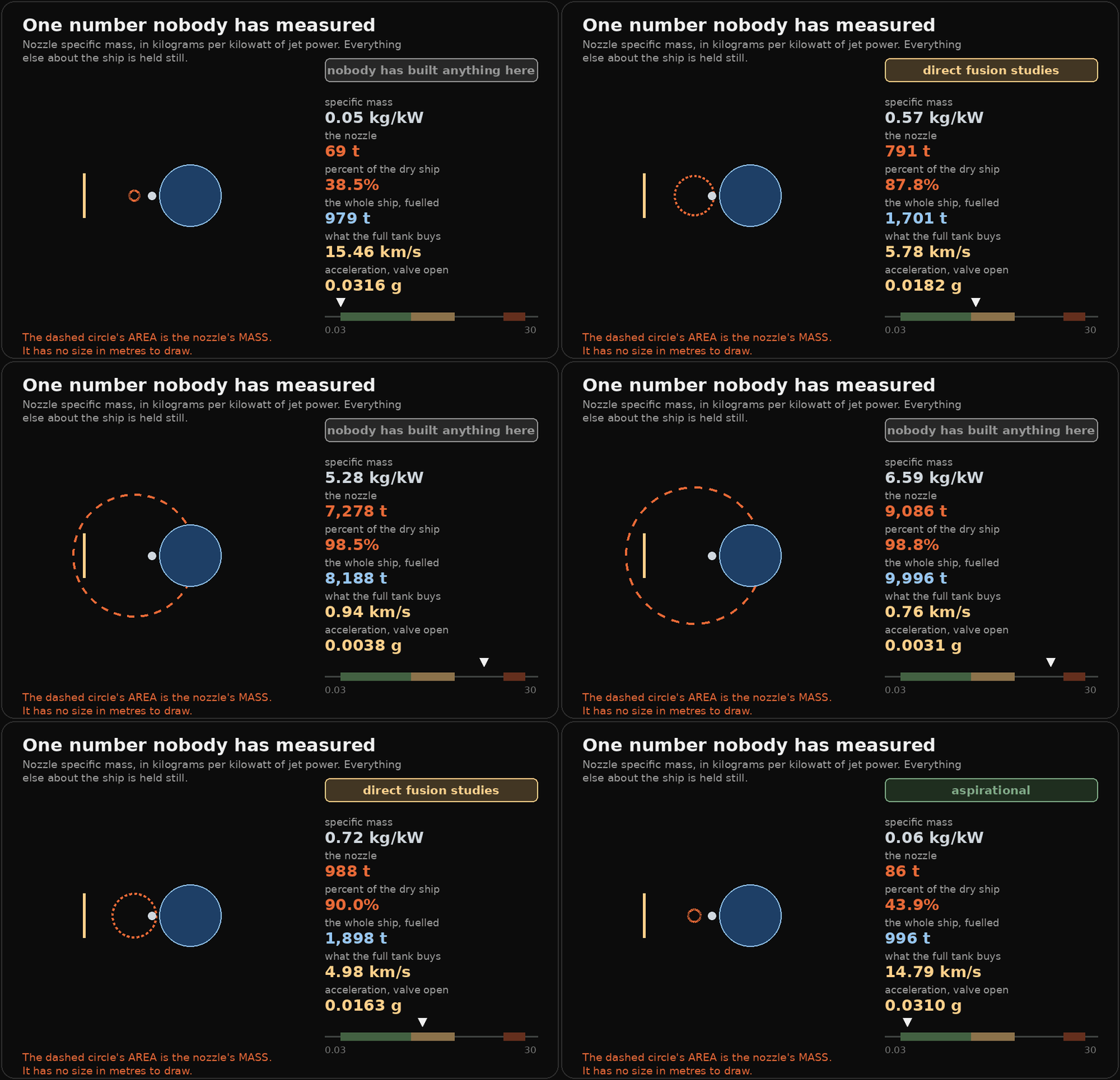
That circle's area is the nozzle's mass, not its size. It has no size. It is a specific mass times a jet power, which gives you kilograms and nothing else, and drawing it at a radius in metres would be inventing the one number the whole run does not have.
What the sweep shows is the range of that coefficient. At the bottom, where people hope it lands, the nozzle is 69 tonnes and the full tank is worth 15.5 kilometres per second. At the top, where electric propulsion hardware has actually been measured, it is 22,074 tonnes, the ship is 99.5 percent nozzle, and the same tank buys 320 metres per second. Same reactor. Same opening. Same 800 tonnes of hydrogen. One transcribed number that nobody has pinned down at this power, and it decides whether this is a spacecraft or a monument.
Here it is with the number in your hand:
That one computes. Every figure in it comes out of four lines of arithmetic evaluated as you drag, not from a stack of frames I rendered earlier and labelled. If the constants in the modules change, that widget changes with them, because there is no third copy of the physics sitting in the page waiting to go stale.
On a phone that supports it, it buzzes when you cross a band boundary. That is the part I am pleased with. The three bands are what people hope, what the papers assume, and what anybody has actually flown, and the boundary between the second and third is the most important edge in this entire run of posts. You can now feel it go past.
And the rock, going in
Different project, same treatment. Rainshower takes two people who saw the same fireball and gives back a patch of ground to walk. The newest piece of it is the last link in that chain: once the burning stops, a meteorite is a rock falling at terminal velocity into dirt, and the dirt has an answer.
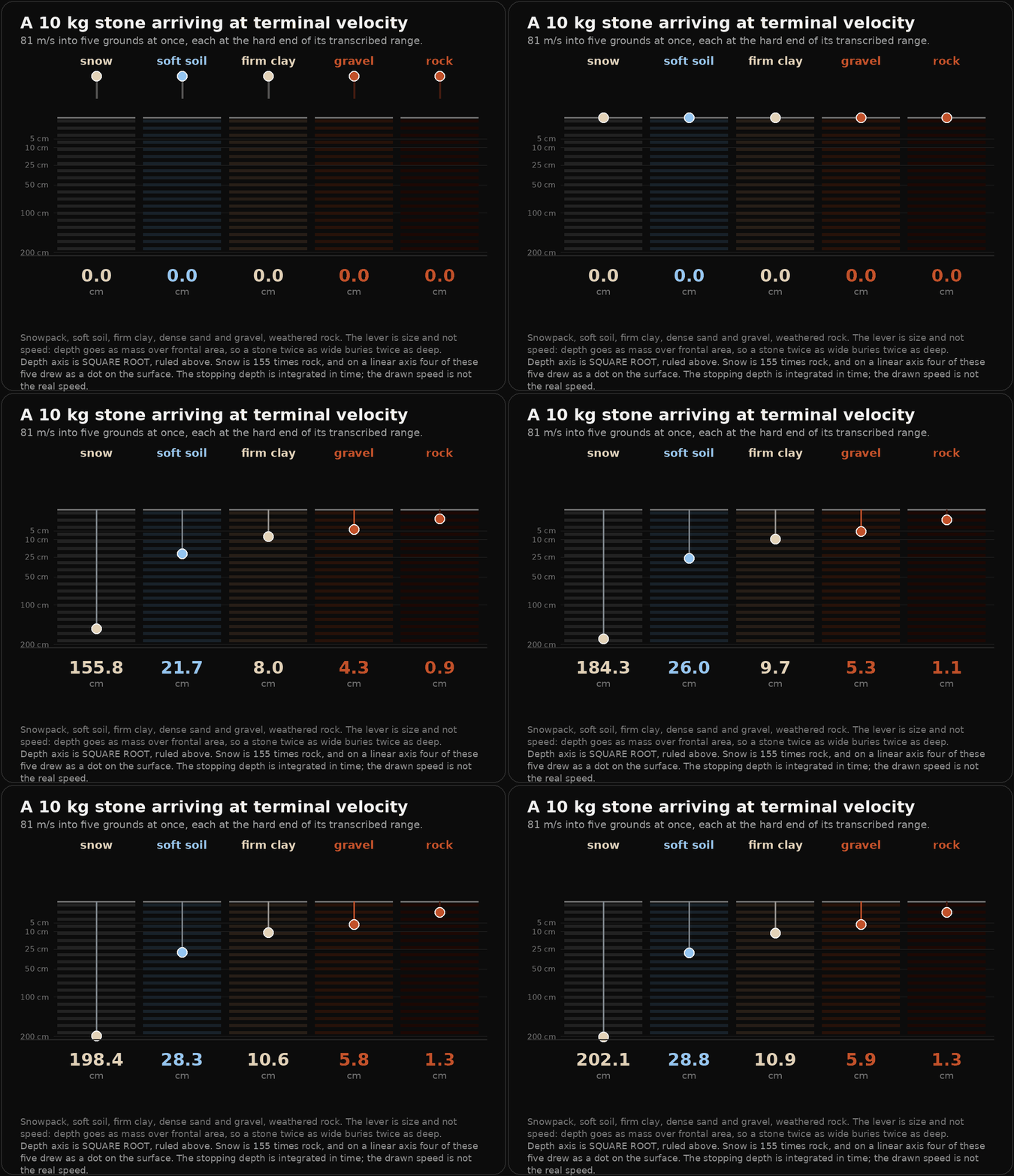
Five grounds, one stone, all at once. Snowpack takes it two metres down. Weathered rock stops it in thirteen millimetres. Those are not drawn to an answer: the motion is stepped in time, and the closed form is computed separately as the check. They agree to better than a thousandth of a percent in all five lanes, which is the two-routes rule that everything in that project runs on.
Drag the mass and it drops again. Drag the ground and it changes what it drops into. Both ends of each soil's transcribed range are drawn, the solid line being the hard end and the ghost the soft one, because the honest output here is a band and a single number would be a lie with a decimal point on it. The default is the hard end, which gives the shallower hole, because a tool that promises somebody a deeper hole than they will find is worse than no tool.
The thing worth taking away is the lever. Depth goes as mass over frontal area, which for a fixed density is just the diameter, so a stone twice as wide buries twice as deep and there is no regime change anywhere in the range. Speed barely enters by comparison. That is why the useful question in a field is how big, not how fast.
What it cost to make three GIFs
Half the value in this site is the part where something did not work, so here is that part.
The first version of the sweep was fourteen megabytes. One animation. The still panels on this site carry a soft background gradient, and I reused the same helper for the frames without thinking about it. A gradient is catastrophic in a GIF: every pixel of every frame differs slightly from the frame before, so there is no run of identical colour to compress inside a frame and no region to skip between them. A flat field costs one colour out of the palette. That one change plus dropping Floyd-Steinberg dithering, which scatters error pixels that differ frame to frame even where the picture does not, took it to 261 KB. Fifty-four times smaller, and on screen you cannot tell.
A pause is a long frame, not repeated frames. I wanted the burial animation to hold at the end before looping, so I appended the last frame ten times. The optimiser correctly noticed that ten identical frames encode nothing and dropped them, the pause silently vanished, and the loop snapped round. The fix is to give one frame a longer duration.
The layout broke when the plate got smaller and nothing said so. Shrinking the canvas to keep the file down clipped the title mid-word, pushed a label off the right edge, and left two readouts and an entire scale bar outside the image. Everything still rendered. Everything still ran. The figure was simply missing a third of itself, and the only way to find that was to pull frames out of the finished GIF and look at them.
And the haptics do not work on an iPhone. There is no vibration API in iOS Safari, no polyfill, and no way around it, because the capability is not exposed to the web on that platform at all. So the widgets check for the function and only offer the toggle where the browser actually has it, rather than showing a switch that does nothing. A control that promises feedback and gives none reads as broken hardware, and the reader blames their phone.
Why the sliders compute
The easy build for both of those controls is a sequence of pre-rendered frames scrubbed by a slider. It looks identical, it is less work, and it would have been the wrong thing.
A frame sequence is fifty pictures somebody made, with a slider on the front implying they are the answer. Nothing connects them to the code any more. Change a constant in the module and the widget goes on confidently showing the old world, and it looks exactly as authoritative as it did the day it was right.
That is the failure this whole site is about, so the widgets carry the arithmetic instead. It is four lines in each case. The figure scripts carry the same four lines independently and print both sides of the comparison when they run. The modules carry them a third time with tests around them. Three implementations, and they are required to agree.
A picture that moves is still a picture. It can still be wrong beautifully. The only thing that helps is that somewhere underneath, the thing being drawn is the thing being computed.