Our wallet tracker is open source and read-only: it watches public addresses across eight chains, prices what they hold, logs mining payouts at the value they arrived, and cannot move a coin. That was v1. Today it got a ledger.
This post is for developers. It walks through what was added, why it is built the way it is, and where to look in the code. If you just want to see it, the demo mode in Try it, at the end, takes four commands and needs no addresses.
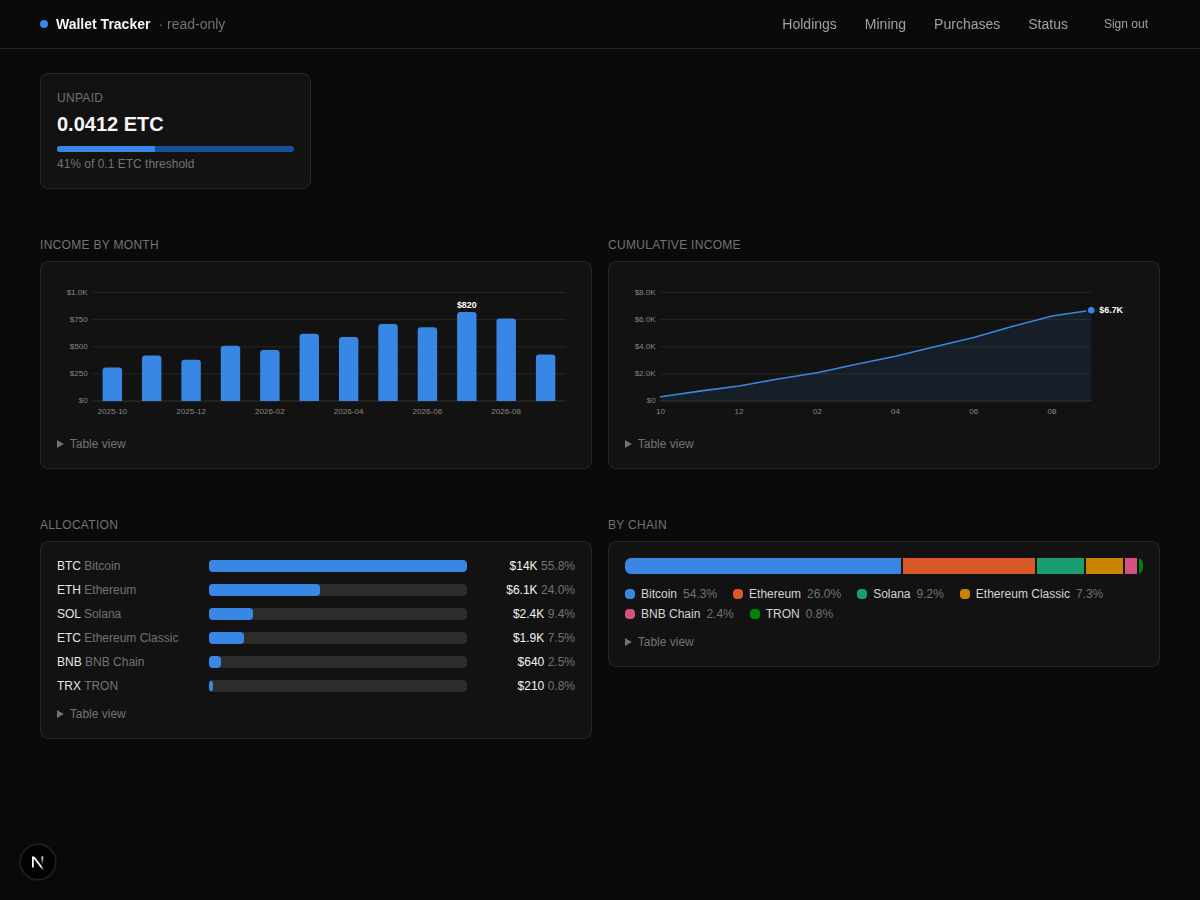 The v1 dashboard. Every chart is inline SVG.
The problem with balances
An RPC node will tell you what an address holds right now. It will not tell you what it held last Tuesday. Balances have no memory. If you want a value-over-time chart, or to know how your allocation has drifted, somebody has to write the numbers down as they go by.
So the app does. Every time the holdings page loads and the portfolio has a priced total, it writes one row for that UTC day: the total and every priced position behind it.
await d.collection("snapshots").updateOne(
  { day: new Date().toISOString().slice(0, 10) },
  { $set: { ts: Math.floor(Date.now() / 1000), total, positions } },
  { upsert: true },
);
One row per day, keyed on the day, last write wins. A unique index on day makes the upsert safe under concurrent loads. It is best-effort by design: if the database is down the page still renders, it just does not remember today.
The first version of this only stored the total. Rows written by v1 have no positions, and the code treats that as "skip for composition, still use for the value line" rather than a migration. New fields, old rows, no downtime.
The ledger is a pure module
The interesting logic lives in one file, lib/ledger.ts, and it imports nothing. Not the database, not React, not a date library. It takes plain arrays in and gives plain arrays out.
Two sources feed it. Purchases you logged by hand, and mining payouts read from chain with the USD price captured once at receipt. They become one event type:
export type LedgerEvent = {
  ts: number;  seq: number;  date: string;
  kind: "purchase" | "mining";
  asset: string;   // upper-case symbol
  qty: number;     usd: number;     fees: number;
  via: string;     note: string | null;   ref: string;
};
A few decisions worth spelling out:
- Symbols are normalized.
"eth","ETH", and"ETH (Linea)"all match, so a purchase of ETH lines up against ETH held across two networks. - Fees count toward basis. If you paid $900 plus $9 in fees, your basis is $909. The fee is money that left your account to acquire the position.
- Nothing held is dropped. If a wallet holds an asset that was never logged, it still appears in the comparison with no basis and no percentage, rather than vanishing. Silence would be a lie.
- Value now is only what the wallets hold. Something you bought and left on an exchange shows dollars in and nothing against it. That is the honest answer, and the page says so under the table.
Because the module has no dependencies, the tests run in plain Node with type stripping, no build step, no test framework beyond node:test:
npm test
Seven tests cover merging, ordering, basis math, symbol matching, monthly split, composition ranking, and range slicing. CI runs them alongside tsc and the production build.
Charts without a library
There is no charting dependency. The whole chart module is one file of React components that draw SVG. That is a deliberate choice, and it is not about bundle size.
It is about control. A charting library gives you its marks, its defaults, its idea of a tooltip. Getting it to match a spec means fighting it. Writing the marks yourself means the spec is the code. Ours is short: bars at most 24 pixels thick with a 4 pixel rounded data end and a square baseline, 2 pixel lines, hairline gridlines, text always in the text color and never the series color.
Every chart also ships three things, because a chart readable only by pointer or only by color is not finished:
- A hover tooltip with the exact value.
- Keyboard focus on every mark, with an
aria-labelcarrying the same value. - A table view under the chart, in a
<details>, with every number.
The new stacked-area chart follows the same rules. The core of it is a running stack, then one closed path per band:
const tops: number[][] = [];
let prev = new Array(n).fill(0);
for (const s of series) {
  const t = s.values.map((v, i) => prev[i] + Math.max(0, v));
  tops.push(t); prev = t;
}
const band = (k: number) => {
  const upper = tops[k], lower = k === 0 ? zeros : tops[k - 1];
  const up   = upper.map((v, i) => `${x(i)},${y(v)}`).join(" L");
  const down = lower.map((v, i) => `${x(i)},${y(v)}`).reverse().join(" L");
  return `M${up} L${down} Z`;
};
Each band gets a hairline stroke in the surface color so adjacent hues do not bleed into each other. Hovering anywhere on the plot snaps to the nearest day and lists every asset's value on that day.
 Composition over time. Ranked by the latest day; past seven assets the rest fold into Other so no ninth color is ever needed.
The palette is eight categorical colors validated for the dark surface: every slot clears 3:1 contrast and the colour-vision-deficiency separation floor. That was checked with a script, not eyeballed, and the chart code only refers to slot numbers so the palette lives in one place.
Small things that matter
The range picker anchors on the last snapshot, not on today. If you stop opening the app for a month, "30 days" still means the last 30 days of data you have, and the demo data slices sensibly whatever date it is. A range wider than the history is disabled, because it would show the same picture as "All" and pretend to be different.
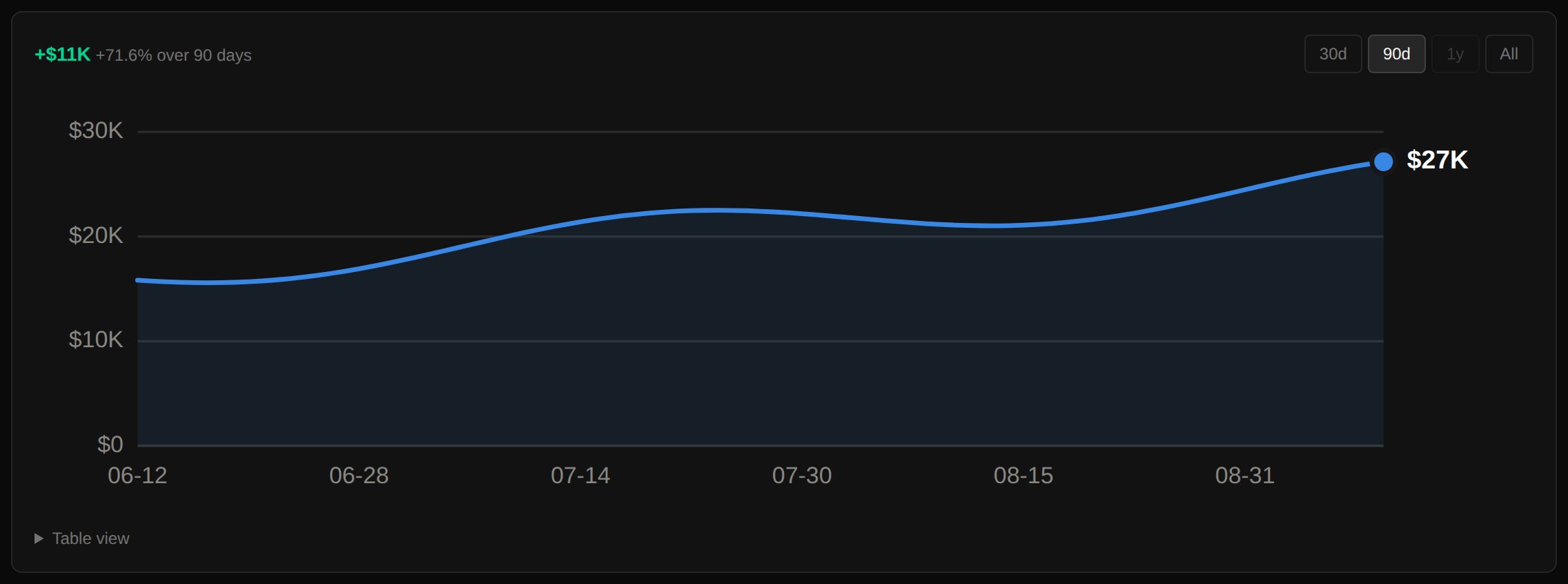 The change over the selected range is printed, with its sign, so the line never has to be read by eye.
Signed bars carry the sign in text. Unrealized gain or loss per asset is drawn from a center axis, gains to the right and losses to the left. Green and red are used, but the number next to every bar carries a plus or minus too. Color is a second cue, never the only one.
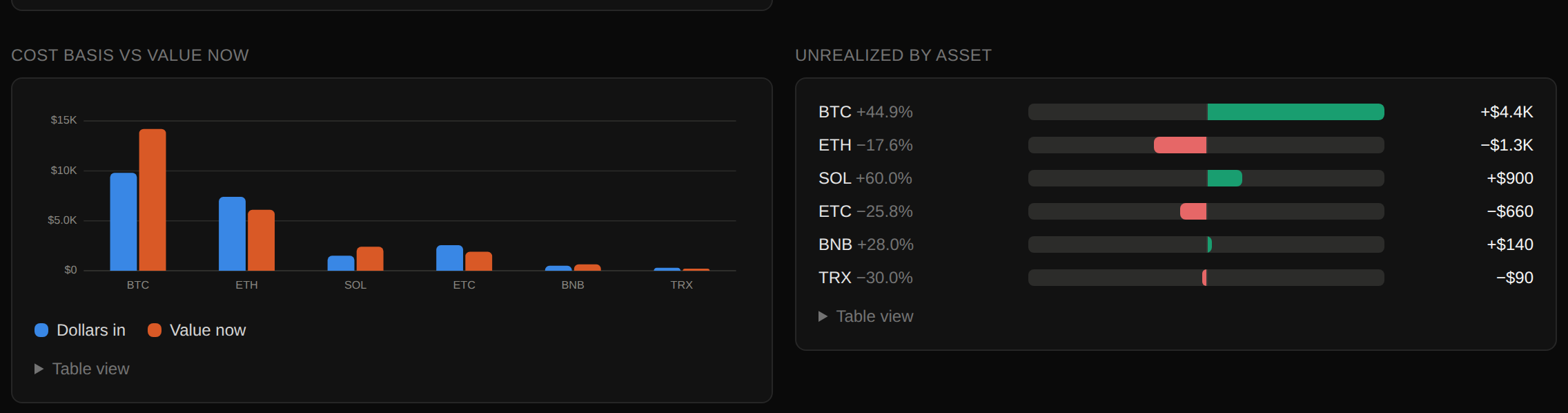 Cost basis beside value now, and the gap between them per asset.
Swaps carry basis with them. Mine one coin and trade it for another, and the ledger needs to know. A swap is logged as what you gave up, what you got, and the dollar value at the time. The units given up leave at their average cost, the gap between that and the swap value is realized, and the units received arrive with the swap value as their basis. That is how most tax regimes treat a coin-to-coin trade, and it keeps "basis" meaning what it says. A swap is never counted as dollars in.
It installs as an app. A web manifest, home-screen icons, a bottom tab bar on phones, and safe-area padding for the notch. Five tabs fit at 390 pixels wide. The manifest and icons are exempt from the login middleware, because the browser fetches them without a session when you add it to your home screen, and a manifest that redirects to a login page is a manifest that does not install.
To put it on your phone once it is deployed, open it in the browser and:
- iPhone or iPad: tap Share, then Add to Home Screen.
- Android: open the browser menu, then Install app or Add to Home screen.
It then opens full screen with its own icon. The login page shows these same two lines on a phone, and hides them once the app is installed.
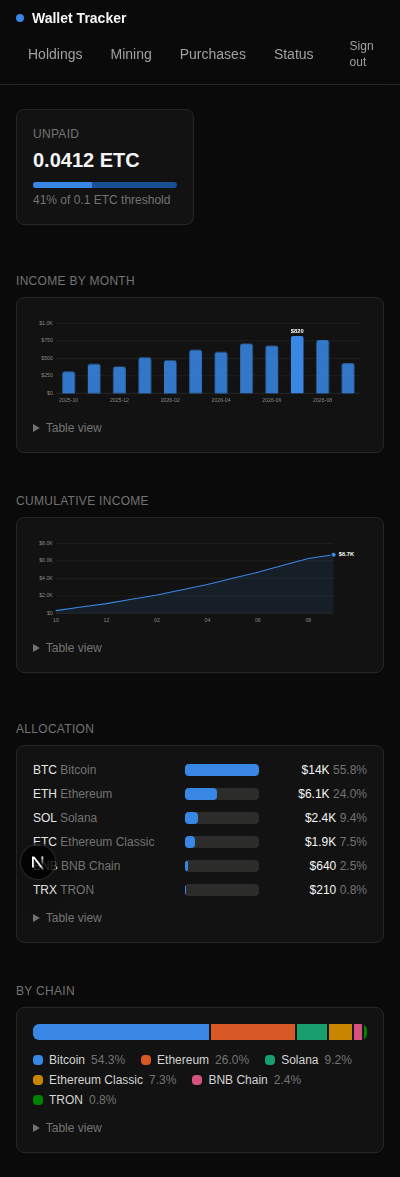 Phone layout. Secondary table columns hide; the CSV export and table views still carry every number.
What it still does not do
It does not talk to an exchange, so it does not know about anything held there. It does not compute realized gains, because it has no sell events; it is a read-only tracker, not a tax tool. It supports one mining pool. All three are honest gaps, and the README says so.
Try it
git clone https://github.com/Gpatrickj7/tofte-wallet-tracker-.git
cd tofte-wallet-tracker-
npm install
DASH_USER=me DASH_PASS=me DEMO_MODE=1 npm run dev
Sign in at localhost:3000 with me / me and open /demo. Everything in the screenshots above is that page. When you want your own numbers, put public addresses in .env.local. Receiving addresses only. There is no field for a private key, and there never will be.
The code is MIT licensed at github.com/Gpatrickj7/tofte-wallet-tracker-. Issues and pull requests are welcome. If you build something on it, tell us.